
Get deploy.yaml back from the server
Since 0.7 the server gives back the deploy.yaml that describes what an application runs. It is how a file that was lost, or was never on this machine, is had again. This page shows the command, what comes back for the secret values, why a file with a masked value is refused, and the same from the dashboard and the API.
Before you begin
- The agent and
shipwickare 0.7 or later. An older agent answersthe agent is older than this shipwick and does not write an application's deploy.yaml. - The command takes a token that may deploy the application: the
deployrole, and for a limited token one of its applications. The text around a reference to a secret is more than a reader is shown elsewhere. - The application has an active deployment.
Print the file
shipwick config my-api                  # to the terminal
shipwick config my-api -o deploy.yaml # to a file✓ Wrote deploy.yaml: my-api as deployment #7 (1.4.2) runs it
! 1 value is not handed out and stands as "********" in the file: env.POSTGRES_PASSWORD
Write it again, or store it with shipwick secret set NAME and refer to it as ${NAME}.
Until then shipwick deploy refuses the file.The file is in the layout shipwick init writes, and describes the active deployment. -o does not write over a file that exists: deploy.yaml already exists, with the same command and --force, which overwrites. The lines about values that are not handed out go to standard error, so shipwick config my-api > deploy.yaml writes the file alone.
What comes back for a secret value
The server does not hand out secret values, and every env value and basic-auth password is one to it. What it does with each depends on how the value arrived.
A value that the deployed file left to the server comes back as exactly that text. With DB_PASSWORD stored by shipwick secret set and this line in the file that was deployed:
env:
  DATABASE_URL: postgres://app:${DB_PASSWORD}@db:5432/app
the line comes back as it was written. The agent remembers it with the deployment — through redeploys, rollbacks, key rotations, exports and imports — and fills it in again when the file is deployed.
Any other value comes back as "********", with a comment on its line: a value that was in the file, or that the CLI filled in from the environment or --env-file. The agent cannot tell LOG_LEVEL: debug from a password, so it returns neither.
# A value shown as "********" was given when the application was deployed and
# is not handed out. Write it again, or store it on the server with
# shipwick secret set NAME and refer to it as ${NAME}. A deployment of this
# file is refused until every such value has been replaced.

name: my-api

image: ghcr.io/company/my-api:1.4.2

port: 8080

replicas: 1

env:
  DATABASE_URL: postgres://app:${DB_PASSWORD}@db:5432/app
  LOG_LEVEL: "********" # not handed out: write the value again, or refer to a secret as ${NAME}

proxy:
  basic_auth:
    - path: /admin
      username: mert
      password: "********" # not handed out: write the value again, or refer to a secret as ${NAME}

restart:
  policy: always
The comment at the top is there only when a value is masked.
An application deployed before 0.7
The references were not kept before 0.7. An application that was last deployed by an older agent has all its secret values masked, also the ones that referred to a stored secret, until it is deployed again from its file. After a deployment by 0.7 the password line above reads password: ${ADMIN_PASSWORD}.
A mask cannot be deployed
A file without masks deploys as it is and gives the configuration that runs, with its secrets as they are on the server now.
A file that still has a mask is refused, by shipwick deploy and shipwick validate alike, with the fields that need a value — whoever sends it. "********" is never accepted as an env value or a basic-auth password, so what the server masks cannot be deployed back as if it were the value. The API answers 400 INVALID_CONFIG:
{ "error": { "code": "INVALID_CONFIG", "message": "invalid deploy.yaml",
             "details": { "fields": [ {
               "field": "env.LOG_LEVEL",
               "message": "******** is what the server shows in the place of this value, not the value",
               "expected": "the value itself, or ${NAME} with the value stored by shipwick secret set NAME" } ] } } }
For each masked value there are two ways on:
- Write the value again in the file, where it is not a secret:
LOG_LEVEL: debug. - Store it on the server and refer to it:
shipwick secret set LOG_LEVEL, andLOG_LEVEL: ${LOG_LEVEL}in the file. From then on the file comes back with the reference.
A stored secret may itself hold the text ********; only a value of env or a basic-auth password in a document may not.
In the dashboard
Change the configuration, on an application's Configuration tab, opens the same document: references to stored secrets are references, and every other secret value stands as "********" and is listed above the document, each with a link that stores it as a secret. The document is checked and deployed from there; one that still holds a mask is refused.
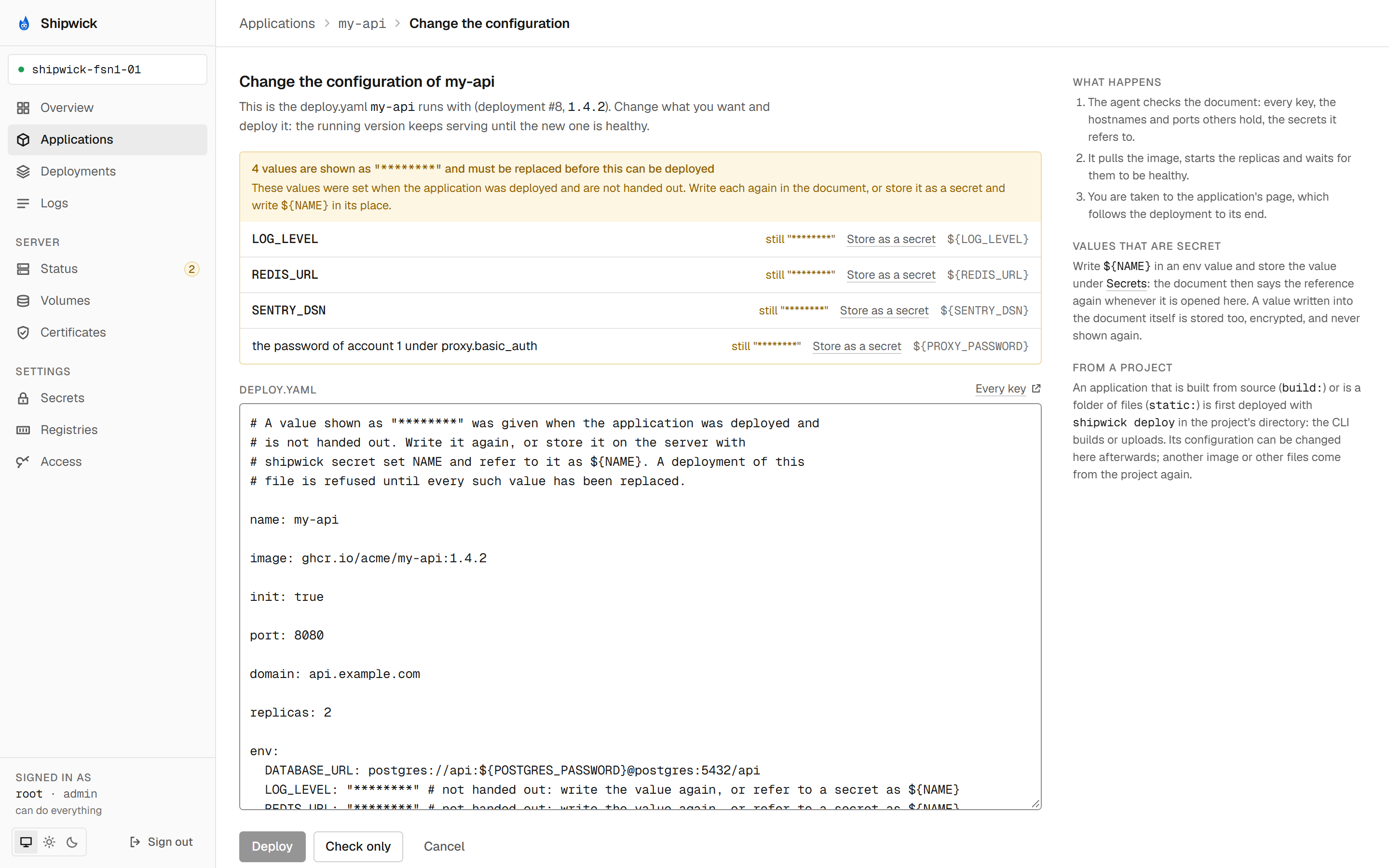
See Use the dashboard.
From a script
curl -H "Authorization: Bearer $SHIPWICK_AGENT_TOKEN" \
  https://agent.example.com/api/v1/applications/my-api/config
The answer holds the document, which deployment it describes, and masked: the fields whose value is the mask, [] when the document deploys as it is. The document goes back unchanged to POST /applications, which deploys the application the document names. See the API reference.
What's next
shipwick configin the CLI reference.- Secrets kept on the server: what a stored secret is, and who may read what.
envand placeholders in thedeploy.yamlreference.- Roll back and redeploy: changing the image without the file.