
How it fits together
One page for the questions before the first command: what the parts are, which of them you need, in what order a fresh server comes together, and what tends to go wrong.
The picture
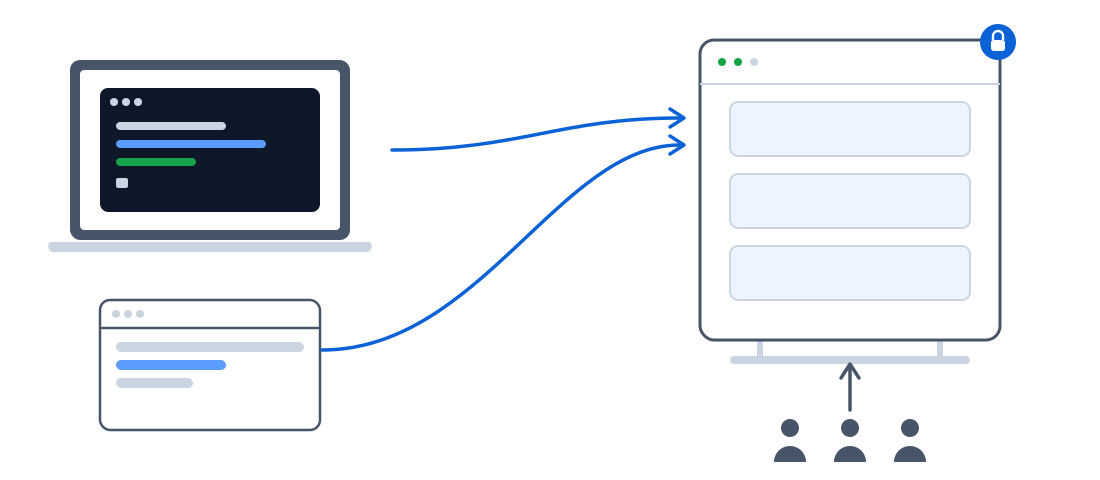
text
 Your laptop, or CI                          One Linux server (a VPS)
 ┌──────────────────────┐                    ┌────────────────────────────────────────────┐
 │  shipwick (the CLI)  │  HTTPS + token     │  Caddy ── ports 80 and 443 ── the internet  │
 │  deploy.yaml         │ ─────────────────► │    │                                       │
 │  Dockerfile          │                    │    ├─► agent  ── Docker ── your containers  │
 │  (docker, if build:) │                    │    │      └── SQLite (one file)             │
 └──────────────────────┘                    │    └─► dashboard (optional)                 │
                                             └────────────────────────────────────────────┘
        Your browser ──── HTTPS ────► dashboard.example.com ─► Caddy ─► dashboard ─► agent
        Your users   ──── HTTPS ────► api.example.com       ─► Caddy ─► your containers
Everything on the server is started by one command, the installer, as three containers next to Docker. Everything on your side is one binary, shipwick.
The parts, and which you need
| Part | Where | Required? | What it does |
|---|---|---|---|
| Docker | server | yes | Runs the containers. It must be there before Shipwick; the installer stops if it is not, and shipwick server install installs it for you. |
| Agent | server | yes | The one process that is Shipwick: takes deploy.yaml, pulls or loads the image, starts the replicas, checks their health, tells Caddy what to route, supervises what runs, keeps its state in one SQLite file. Serves the REST API that the CLI and the dashboard talk to. |
| Caddy | server | yes | The reverse proxy in front of your applications. Holds ports 80 and 443, obtains and renews certificates, balances across replicas, serves static sites from disk. Installed and configured by Shipwick; you never edit its configuration. |
| Dashboard | server | no | The same information and everyday actions in a browser. Skip it by leaving its hostname empty when the installer asks; add it later by setting SHIPWICK_DASHBOARD_DOMAIN in /opt/shipwick/.env. |
shipwick | your laptop, CI | yes | The command-line client. Validates deploy.yaml, builds the image on your machine when the file says build: ., sends it, waits for the result and tells you what happened. Also installs the server over SSH and checks the setup with doctor. |
| A DNS name | your DNS provider | for HTTPS | One record per hostname you use: the API, the dashboard, and every application with a domain. Plain A (and AAAA) records pointing at the server, "DNS only", not proxied through a CDN. |
| A registry | anywhere | no | Only if you want to docker push images and have the server pull them. With build: . the CLI builds on your machine and sends the image straight to the server. CI pipelines usually keep a registry. |
Nothing else: no database to provision, no queue, no second server.
From an empty VPS to a running application
- Get a server with a public IPv4 address and root SSH access. Ubuntu or Debian is the well-trodden path; any Linux with Docker works. 1 vCPU and 2 GB of memory run Shipwick and a handful of small applications.
- Point DNS at it. Create
Arecords for the API hostname and the dashboard hostname (agent.example.com,dashboard.example.com), and for the domain of the first application. Do this before installing: certificates are issued only once a name resolves to the server. - Open ports 80 and 443 (and 443/udp) in the provider's firewall, and nothing else. Port 9000, the agent's own, must never be reachable from the internet.
- Install the server. Either on the server, as root:bashor from your laptop, once the CLI is installed:
curl -fsSL https://get.shipwick.com | shbashThe second form installs Docker if it is missing, runs the same installer over SSH, saves the API token for you and prints the DNS records to create. See Install on a server.shipwick server install [email protected] --agent-domain agent.example.com --dashboard-domain dashboard.example.com - Install the CLI on your laptop and sign in with the token the installer printed:bashSee Install the CLI.
curl -fsSL https://get.shipwick.com | sh -s -- --cli # or: brew install shipwick/tap/shipwick shipwick login --url https://agent.example.com - Check the setup before deploying anything:bashOne line per check — versions, token, Docker, proxy, ports, every domain's DNS and HTTPS — each with what to do about it.
shipwick doctor - Deploy. In your project,
shipwick initwrites a Dockerfile and adeploy.yaml;shipwick deploybuilds, sends and runs it. See Your first deployment.
From the second application on, only step 7 repeats.
Problems you may meet
Each of these was met on a real server. The message you see is in the first column.
| You see | Why | Do |
|---|---|---|
Port 80 is already in use by … from the installer | Something else on the server holds port 80 or 443: another web server, another deployment platform, a leftover container. Automatic HTTPS needs both ports. | Stop or remove what holds them, or use a fresh server. The installer changed nothing yet. |
Docker is not installed | The installer does not install Docker on its own. | curl -fsSL https://get.docker.com | sh, then run the installer again. Or use shipwick server install, which does this step. |
Routing https://api.example.com is waiting for DNS: does not resolve yet; add an A record: api.example.com → 203.0.113.10 | The deployment succeeded, but the hostname does not point at the server yet, so Caddy was not asked for a certificate. | Create the record as the message says. Within a minute the agent notices and the site is served; nothing to redo. |
… resolves to Cloudflare's proxy (104.21.5.6), not to this server: turn the proxy off for this record | The record is proxied ("orange cloud"). The proxy would take the TLS handshake away from Caddy, and no certificate could be issued. | In Cloudflare, switch the record to "DNS only" (grey cloud). Proxied records are not supported yet. |
| The browser shows a certificate error minutes after the record was created | Caddy tried to get a certificate while the record was missing, failed, and is waiting before it retries. | Wait a few minutes. If it persists: cd /opt/shipwick && docker compose restart caddy. Deploying before DNS exists is what the DNS check above prevents. |
Deployment failed … did not become healthy within 30s | The container started but did not answer the health check: wrong port, a path that returns non-2xx, or an application that needs longer to start. | Read the "Last output of replica 1" lines under the message. Fix port or health.path; a slow starter gets health.start_period: 60s. The version that was running kept serving throughout. |
pull access denied or unauthorized when the image is private | The server has no credentials for the registry. | docker login <registry> once on the server, see Pull from private registries. Or use build: . and skip the registry. |
The agent rejected the API token | The token is wrong, revoked, or belongs to another server. | shipwick login with the token from /opt/shipwick/.env on the server. Several servers: shipwick context ls. |
cannot reach the Shipwick agent at … | The URL is wrong, the API hostname was left empty at install, or DNS for it is missing. | shipwick doctor. If you chose not to expose the API, use the SSH tunnel: Reach the API without a hostname. |
429 RATE_LIMITED / "Too many failed attempts from this address" | Twenty wrong tokens within a minute from one address. | Wait a minute. A valid token is never refused; only wrong ones are answered this way. |
The site answers 503 | The application is stopped (shipwick stop), or no replica is healthy. | shipwick status <app> says which. shipwick start, or read the replicas' output with shipwick logs. |
refers to ${DATABASE_PASSWORD}, which is not set | A placeholder in deploy.yaml has no value on your machine and no secret on the server. | shipwick secret set DATABASE_PASSWORD once, or pass --env-file. |
After delete, the data is still on disk | Volumes outlive the application on purpose. | shipwick volumes lists them; shipwick volumes rm <name> removes one you no longer want. |
| I lost the token | It is printed once, but kept on the server. | grep SHIPWICK_AGENT_TOKEN /opt/shipwick/.env as root. |
| The server rebooted | Nothing to do: the containers restart on their own, and the agent puts every application back as it was. | shipwick ps to confirm. |
When something is not on this list, shipwick doctor is the first command to run, and shipwick status <app> the second.
What's next
- Install on a server — the installer in detail, what it writes, the token.
- Install the CLI
- Your first deployment
- Architecture — the same picture for engineers: how the parts talk, what the agent stores, what Shipwick leaves out.
- Security — what an admin token means, and what to keep private.