
Find out why it died
What a container printed is Docker's to keep, and Docker keeps it as long as the container. A rollout removes the replicas it replaces, a failed deployment is cleaned up, a job's container goes when the job is done, and each takes its output along. A replica that crashes and is started again keeps its log only until the logging driver rotates it away.
Since 0.7 the agent copies the last output of every container whose run ends into a log archive on the server, with what it is the output of and how it ended. This page shows the one command to run after a crash, how to list and search what is kept, what is kept of what, for how long, where it lives, and what cannot be kept.
Before you begin
- The agent and
shipwickare 0.7 or later. An older agent answersthe agent is older than this shipwick and keeps no log archive: it shows the output of running containers only. - Reading the archive takes the role that reads the logs:
read. See Create tokens for CI and teammates. - The archive starts with the first container that ends after the upgrade. Nothing from before is in it.
After a crash
One command, the morning after:
shipwick logs my-api --previous#12 replica 1 (1.4.2), shipwick_my-api_12_1: crashed (exit 3) just now; 3 lines
starting up
connecting to the database
FATAL: could not connect to db:5432--previous, or -p, shows the last run of a replica that ended, whatever ended it. The first line says which deployment and replica it was, the version, the container, why it ended and when, and how many lines are kept. --deployment <#> and --replica <n> narrow it to the last run of that deployment or that replica.
You do not have to remember the flag. When shipwick status shows a replica that died or a deployment that failed, it ends with the exact command:
Replica 1's last output before it exited with code 3, just now:   shipwick logs my-api --id 4
What deployment #13 printed before it failed:                     shipwick logs my-api --deployment 13
The first line reads before it ran out of memory for a replica that was killed for memory, and before it was restarted for its health check for one the supervisor restarted.
When nothing has ended yet, the command says so: Nothing is kept of an earlier container of my-api: none has ended since the agent began to keep their output, or what was kept has aged out.
See what is kept
shipwick logs my-api --listID ENDED OUTPUT OF ENDED BECAUSE LINES SIZE
4 just now #12 replica 1 crashed (exit 3) 3 72 B
3 20s ago #12 replica 1 crashed (exit 3) 3 72 B
2 31s ago #12 replica 1 crashed (exit 3) 3 72 B
Read one with: shipwick logs my-api --id <ID>A replica in a crash loop leaves one entry for each attempt, with that attempt's output. -n limits the list, to at most 500 entries; --deployment, --replica and --run narrow it.
| Column | |
|---|---|
OUTPUT OF | The deployment's number and the replica, or run 14 of nightly-report for a run of a job or a command |
ENDED BECAUSE | See below |
LINES | How many lines are kept. last 2000 when the run printed more than is kept |
SIZE | The size of those lines as text |
ENDED BECAUSE | |
|---|---|
crashed (exit 3) | The process exited by itself with a code other than 0 |
exited (exit 0) | The process exited by itself with code 0 |
out of memory | It was killed for exceeding its memory limit |
restarted: unhealthy | The supervisor restarted it for failing its health check |
stopped | The application was stopped |
replaced | A newer deployment took its place |
deployment failed | A replica of a deployment that failed, removed with it; with (exit 1) or : out of memory when it had died by itself |
removed | Removed for another reason: a leftover, a rollback that failed |
ended unseen | The run ended while no agent was running, and the container was running again when one started; why it ended is not known |
A run of a job or a command is described as shipwick jobs describes it.
--id shows one entry, and --run <id> the output of a run of a job, a pre_deploy command or shipwick run, by the run's id:
shipwick logs my-api --id 3
shipwick logs my-api --run 14
Of one entry everything kept is shown; -n limits it to its last lines, and -t adds the times.
Search
--search looks through what is kept and what the replicas that exist still hold, together:
shipwick logs my-api --search fatal== #12 replica 1, shipwick_my-api_12_1, kept as 2 ==
2026-10-04 03:22:04.062 FATAL: could not connect to db:5432
== #12 replica 1, shipwick_my-api_12_1, kept as 3 ==
2026-10-04 03:22:15.126 FATAL: could not connect to db:5432The text is looked for inside lines, whatever its case; it is not a pattern. The lines are shown oldest first, under a line for each container they come from: kept as 2 names the archive's entry, and a line without it comes from a container that exists. A search shows each line's time unless you say otherwise.
| Flag | |
|---|---|
--search TEXT | Lines that contain the text. At most 256 bytes, one line. |
--since, --until | Only lines from then on, or up to then: how long ago (30m, 2h, 7d), a date, or a time in RFC 3339. |
--deployment <#> | Only the output of this deployment, by its number in shipwick status. |
--replica <n> | Only the output of this replica. |
--run <id> | Only the output of this run of a job or a command. |
-n | How many lines: the newest 100 that match, up to 5000. |
Each of them works without --search too: shipwick logs my-api --since 2h is everything the application printed in the last two hours, kept or current, and --deployment 13 everything deployment #13 printed.
When there are older lines than the ones shown, the command says so and how to reach them: Show more with -n, or go back with --until and the time of the oldest line shown. Nothing found reads No lines match, in what is kept or in the running containers.
Of a container that exists its last 50,000 lines are looked at. The output of a job that is still running is found once the run has ended. None of these flags goes with --follow, which streams the running containers.
A search reads; there is no index. The agent rules out what the question rules out — other deployments, other replicas, entries from before --since — and reads the rest, about 128 MB for one request, and the CLI asks again from where the last answer stopped. On the development stack, an application with 2.5 million archived lines in 257 entries (301 MB of output, 64 MB on the disk) was searched to the end in 1.3 seconds, over three requests.
What is kept of what
| What ended | What is kept of it |
|---|---|
| A replica that exits by itself: a crash, a kill for memory, a clean exit. Copied when the supervisor notices, in the background | The run's last 2,000 lines, at most 1 MB |
| A replica the supervisor restarts for failing its health check | The same, of the run that was ended |
| The replicas of an application that is stopped | The same |
| A container that is removed: a replica a deployment replaced, the replicas of a deployment that failed, a leftover | What it printed since its last copy, within the same bound, taken before it is removed |
A run of a job, of a pre_deploy command, of shipwick run | Its last 10,000 lines, at most 4 MB |
A line longer than 16 KB is cut there. Every line keeps the time Docker recorded for it and whether it was written to standard output or standard error. A copy begins where the last copy of the same container ended, so no line is kept twice. A container that printed nothing leaves no entry — unless it died, with an exit code other than 0 or for memory: that it died is then the entry.
How much, and for how long
An entry is kept for 14 days after its container ended, and the archive takes at most 1 GB of the disk. The lines are stored compressed, about a fifth of their size. Two variables of the agent change the bounds:
| Variable | Default | |
|---|---|---|
SHIPWICK_LOG_RETENTION_DAYS | 14 | How long an entry stays, in days after its container ended, from 1 to 365. |
SHIPWICK_LOG_RETENTION_SIZE | 1gb | What the archive may take on the disk, as 500mb or 2gb. 0 keeps nothing. |
Set them in /opt/shipwick/.env and apply the change with cd /opt/shipwick && docker compose up -d. See Agent configuration.
- Over its size, the application that holds the most loses its oldest entries first. One that fills the archive makes room out of its own output, and what a quiet application printed when it crashed last week stays.
- While the disk is as full as its alert's threshold — 85%,
SHIPWICK_ALERT_DISK_PERCENT— the archive does not grow at all: a new entry makes room for itself by removing at least as much. - The output of a job's runs follows the job's history, its last 50 runs.
shipwick server status shows what the archive holds:
Log archive 1.1 KB of 1 GB, 1 entry, kept 14 daysWhere it is, and where it is not
The lines are gzip files under <data dir>/logs, one per entry, readable on the server with zcat; the agent's database holds one row for each, not the output.
They are as sensitive as the logs themselves — whatever the application printed — and are treated as such. Reading the archive takes the role that reads the logs. The archive puts nothing into events, notifications or the audit trail; a failed deployment's events quote the last 20 lines of the replica that failed, as they always did.
The archive is not encrypted
The files are not encrypted, like the logs Docker keeps next to them. Whoever can read the agent's data directory can read them. An application that prints secrets has them in its logs, and now in the archive for 14 days.
Three things leave it behind on purpose:
shipwick deleteremoves the application's archived output with it. The volumes and the backups stay, because the application may want its data back; nothing needs its old output back.- The backup of the agent's state does not hold it: seven daily copies of every line would be most of the backup. A database restored from one starts with an empty archive.
- An export does not hold it, like the history: it describes the old server.
What cannot be kept
The copy reads what shipwick logs reads.
- A container removed by something other than Shipwick —
docker rm, a prune — takes its output with it. - Lines the logging driver had already rotated away are gone: 30 MB per container, unless
loggingsays otherwise. - An application whose remote logging driver keeps no local copy has nothing to copy; see Read logs.
- An agent that was down when a replica died makes the copy when it starts, as long as the container is still there.
In the dashboard
An application's Logs tab has four views. Live is the output of the running replicas. Previous is the last output of the container that ended most recently; the tab opens on it when the application is not healthy and a replica crashed, was killed for memory or was restarted for its health check. Archive lists what is kept and opens an entry, and Search looks through all of it and the running replicas for a piece of text.
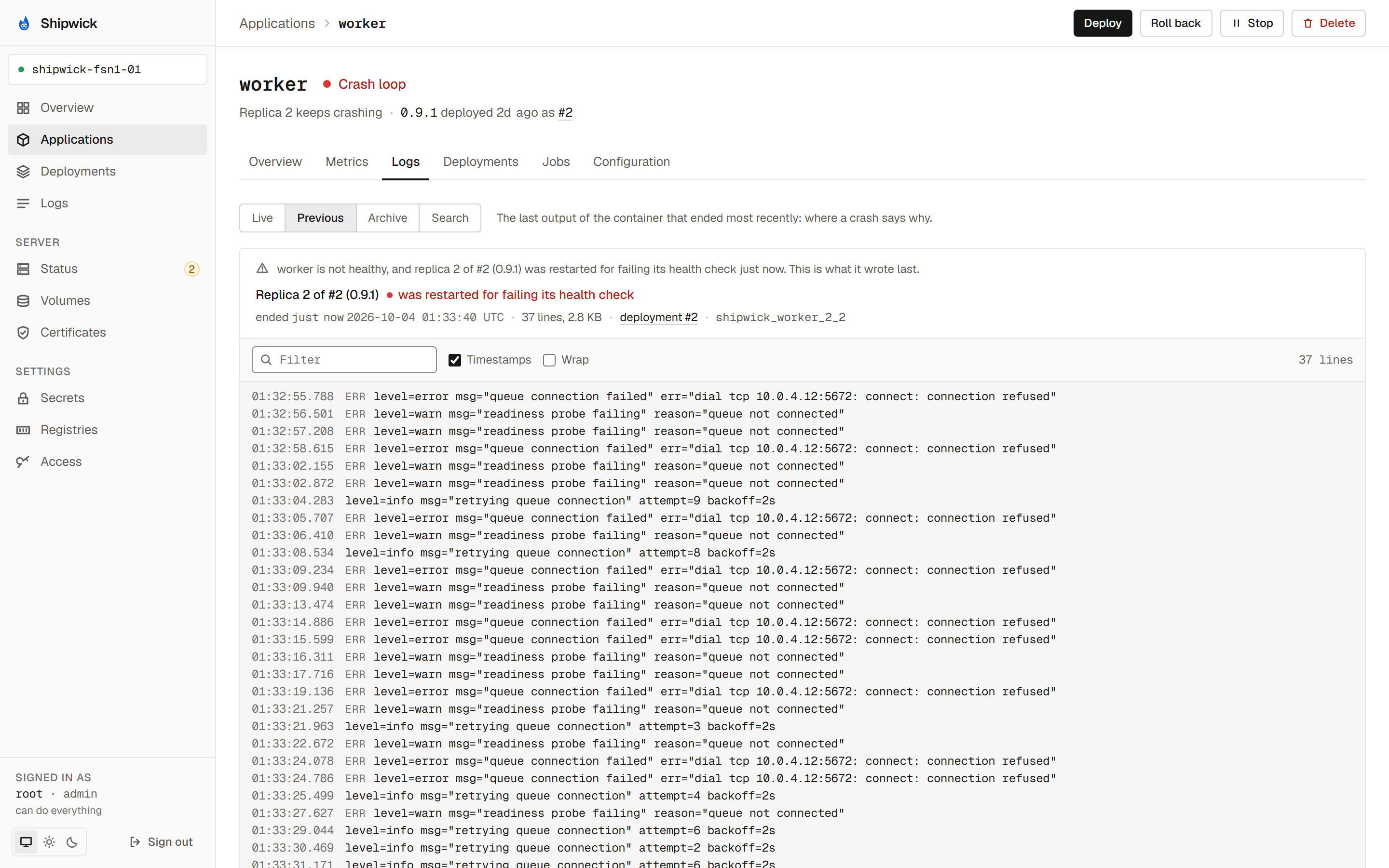
On the overview tab a replica that restarted links to its last output, and a failed deployment's page links to the output of its replicas. See Use the dashboard.
From a script
curl -H "Authorization: Bearer $SHIPWICK_AGENT_TOKEN" \
  "https://agent.example.com/api/v1/applications/my-api/logs/archive?kind=replica&limit=1"
GET /applications/:name/logs/archive lists the entries, …/logs/archive/:id returns one with its lines, and …/logs/search searches. See the API reference.
What's next
- See what is running:
shipwick statusand the logs of the running replicas. - Health checks and supervision: why a replica is restarted, and when the restarts are slowed down.
- Run scheduled jobs and one-off commands: the runs whose output
--runshows. shipwick logsin the CLI reference.